
Introduction
Microsoft Azure is one of the most powerful cloud platforms available, but with so many services on offer, it can be difficult to know where to start. Whether you are a developer, data engineer, or IT professional, understanding Azure’s core offerings can help you build, scale, and secure your applications more effectively.
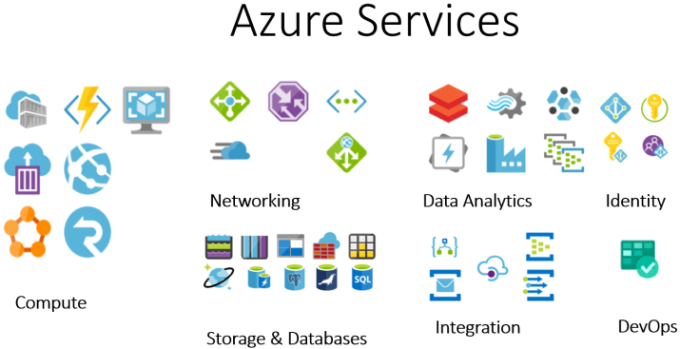
In this guide, we will walk through the most important Azure services compute, storage, networking, databases, AI, and security. By the end, you will have a clear understanding of what Azure can do and how to make the most of it for your projects.
What is Microsoft Azure?
Microsoft Azure is a cloud computing platform that allows you to build and run applications and services without needing your own data centers. It provides a broad range of tools, from basic compute power to advanced AI and machine learning, addressing almost every business need.
Here is why Azure has gained immense popularity over the years:
- Global reach and compliance: With data centers in more than 60 regions worldwide, Azure ensures your data meets local compliance and regulatory requirements.
- Hybrid cloud flexibility: Azure’s hybrid cloud capabilities let you run some resources on your own servers while using the cloud for others ideal if you are not ready to move everything to the cloud.
- Scalable and cost-effective: You can easily scale resources up or down based on your needs. With a pay-as-you-go model, you only pay for what you use.
- Developer-friendly support: Azure supports a wide variety of programming languages, giving developers the freedom to work with the tools they are most comfortable with.
Core Azure Services
Azure offers a broad range of services to address different business needs. Let us explore its core services to understand how they can help us.
Azure Compute Services
Azure Compute Services provide a series of tools to help us build and deploy applications efficiently. These include Azure Virtual Machines (VMs), Azure Kubernetes Service (AKS), Azure Functions, and Azure App Service.
Azure Virtual Machines (VMs)
Azure VMs enable virtualization without requiring hardware investments. They provide customizable environments for development, testing, and cloud applications, allowing you to run different operating systems such as Ubuntu on a Windows host depending on your needs.
One of the key advantages of Azure VMs is the pay-as-you-go pricing model. It lets you scale resources up or down as needed, ensuring cost-efficiency without wasting resources.
Azure Kubernetes Service (AKS)
AKS is a managed Kubernetes platform for deploying and managing containerized applications. These applications run in standalone containers with all their dependencies, maintaining consistent performance across different environments.
AKS handles node management, health monitoring, and maintenance, while you only pay for the AKS nodes running your applications. This automated approach to managing and scaling containerized applications is known as container orchestration.
Here is what makes AKS the ideal solution for container orchestration:
- Identity and security management: Secure your AKS environment with Azure Policy, Kubernetes RBAC, and Microsoft Entra ID for robust access control.
- Logging and monitoring: Monitor cluster health using Container Insights and analyze network traffic with Advanced Container Networking Services.
- Streamlined deployments: Use pre-built Kubernetes configurations and Draft for rapid application deployments.
- Clusters and nodes: Optimize resources with storage integration, GPU usage, multi-node pools, autoscaling, and confidential computing for enhanced security.
- Storage volume support: Choose from multiple storage solutions such as Persistent Volumes, Azure Container Storage, Azure Disks and Files CSI drivers, and Azure NetApp Files.
AKS is also well-suited for microservices architecture. Kubernetes Service Objects provide:
- A static internal IP assigned to a group of pods for consistent service availability.
- Automatic load-balancing of traffic to pods.
- Internal DNS names to services for efficient API gateway and service-to-service communication.
Azure Functions
Azure Functions is a serverless computing solution that eliminates the need for server maintenance. Instead, it automatically provides the resources needed to run your application smoothly.
It supports multiple programming languages including C#, Java, JavaScript, Python, and PowerShell, so you can focus on writing meaningful code in your preferred language and deploy it to the Azure cloud.
Azure App Service
Azure App Service simplifies the development of websites, APIs, and mobile backends by providing a fully managed environment with built-in scalability, security, and DevOps capabilities. It supports multiple language stacks such as .NET, Java, Node.js, Python, and PHP.
As a Platform as a Service (PaaS), Azure App Service provides:
- Reliable and scalable hosting: Managing a production environment with global availability.
- Containerization and flexibility: Run applications in Docker containers or leverage App Service on Linux.
- Built-in security and automation: Automatic scaling, load balancing, and automated management.
- Integrated development tools: Seamless integration with VS Code and Java tools.
- API and mobile backend support: Deploy and manage RESTful APIs effortlessly.
- Serverless capabilities: Run functions without managing servers.
Azure Storage Services
Let us now explore the different Azure storage options, including Blob Storage, Disk Storage, File Storage, and Data Lake Storage, along with their use cases.
Azure Blob Storage
Azure Blob Storage is an object storage solution for storing large volumes of unstructured data such as text, images, and files. You can access objects globally via HTTP/HTTPS or through Azure Storage services such as the REST API, PowerShell, the CLI, and client libraries in .NET, Java, Node.js, Python, and Go.
Azure Blob Storage offers three types of resources:
- Storage account: Assigns a unique address to each object, including the account name and the Blob storage endpoint.
- Container: Organizes a set of blobs and can store an unlimited number of them.
- Blob: Three types Block blobs store text and binary data; Append blobs optimize append operations for logs; Page blobs store random-access files such as VHDs.
Azure Disk Storage
Azure Disk Storage is a block disk storage solution used with Azure VMs. It uses virtualized managed disks for which you only specify the disk size and type, while Azure handles the provisioning. Options include ultra disks, premium and standard SSDs, and standard HDDs.
Notable benefits of a managed disk:
- 99.99% availability with a 0% annual failure rate.
- Support for up to 50,000 VM disks.
- Protection against data center failures.
- Easy recovery with Azure Backup, including Azure Disk Backup.
- The ability to assign specific permissions to one or more users.
Azure File Storage
Azure File Storage is a fully managed, serverless cloud file storage solution. It supports simultaneous access from cloud and on-premises deployments using standard protocols such as SMB, NFS, and the Azure Files REST API. You can create, mount, and manage file shares using PowerShell and Azure CLI.
Azure Data Lake
Azure Data Lake is a centralized repository for storing structured and unstructured data in its native format. Built on Azure Blob Storage, it supports big data analytics, allowing you to store petabytes of data and manage large volumes efficiently.
Azure Data Lake is not a separate service or account type it is a set of capabilities built into Blob Storage. Data you ingest is stored as blobs managed by Azure Blob Storage.
Azure Networking Services
Azure networking services can work independently or together, depending on your needs.
Azure Virtual Network (VNet)
Azure VNet is the building block for your private network. It enables Azure resources, such as virtual machines, to communicate with each other, with the internet, and with on-premises networks.
To enable communication between Azure resources, you can use:
- Virtual Network (VNet) for isolated networking.
- VNet service endpoints to securely connect to Azure services.
- VNet peering to link multiple VNets for cross-network communication.
Azure Load Balancer
An Azure Load Balancer distributes incoming network traffic across backend resources to ensure high availability and reliability. It operates at Layer 4 of the OSI model and offers two types:
- A public load balancer provides inbound and outbound connectivity for VMs within a virtual network.
- An internal (private) load balancer manages inbound traffic within a private network.
Azure VPN Gateway
Azure VPN Gateway enables secure, encrypted communication between Azure virtual networks and on-premises sites via the internet. It supports multiple configurations:
- Point-to-point: Direct connection between two networks.
- Site-to-site: Secure connection between on-premises networks and Azure virtual networks.
- ExpressRoute coexisting: Combines VPN Gateway with ExpressRoute for hybrid cloud scenarios.
Azure Database Services
Azure Database Services offers both relational and non-relational databases, allowing you to choose the best option for your application’s needs.
Azure SQL Database
Azure SQL Database is a fully managed database engine that automatically handles upgrades, patches, backups, and monitoring. It offers two purchasing models:
- vCore-based model: Select the number of vCores, memory, speed, and storage.
- DTU-based model: Combines compute, memory, and I/O resources for simpler scaling.
And two deployment options:
- Single database: Ideal for modern cloud applications and microservices.
- Elastic pool: A collection of individual databases sharing resources.
Azure Cosmos DB
Azure Cosmos DB is a fully managed NoSQL, relational, and vector database known for:
- Single-digit millisecond response times for high-speed data processing.
- Automatic scalability to efficiently handle dynamic workloads.
It is ideal for globally distributed applications that require low latency and high availability.
Azure Database for MySQL / PostgreSQL
Azure provides fully managed database services for both MySQL and PostgreSQL .
Azure Database for MySQL:
- Supports flexible server and single server deployment options.
- Provides automated backups, scaling, and patches.
- Ideal for e-commerce platforms, web and mobile applications, and content management systems.
Azure Database for PostgreSQL:
- Offers flexible server deployment, JSON and full-text search support, and geospatial data processing.
- Integrates with analytics and AI/ML solutions.
- Suitable for AI/ML-driven applications, BI and reporting, and financial and geospatial applications.
Azure Cache for Redis
Azure Cache for Redis is a fully managed in-memory data store that improves performance and scalability by caching frequently accessed data. It supports common architecture patterns:
- Data cache: Uses the cache-aside pattern to load data only when needed.
- Content cache: Stores static web content in memory for faster access.
- Session store: Stores minimal data in cookies as keys to query user history from a database.
- Distributed transactions: Executes multiple commands in a single atomic transaction to maintain data consistency.
Azure AI and Machine Learning Services
Microsoft Azure offers a range of AI and Machine Learning services to enhance application intelligence.
Azure Machine Learning
Azure Machine Learning is designed for ML professionals, data scientists, and engineers to accelerate model training and MLOps. Azure Machine Learning Studio provides tools for generative AI application development, including:
- Model catalog: Offers models from Azure OpenAI, Mistral, Meta, Cohere, NVIDIA, Hugging Face, and Microsoft.
- Prompt flow: Simplifies LLM-based application development with rapid prototyping, experimentation, and deployment.
- Enterprise security: Integrates Azure VNet, Azure Key Vault, and Azure Container Registry.
Azure Cognitive Services
Azure Cognitive Services allows developers to add cognitive intelligence to applications without AI expertise. Key services include:
| Service | Description |
|---|---|
| Face | Detects and identifies people and emotions in images |
| Document Intelligence | Builds data-driven solutions from documents |
| Custom Vision | Customizes image recognition for businesses |
| Azure AI Search | AI-powered search for mobile and web apps |
| Language | Adds natural language processing capabilities |
| Content Safety | Detects undesirable content |
| Translator | Translates over 100 languages |
| Vision | Analyzes content in images and videos |
| Speech | Covers speech-to-text, TTS, translation, and speaker recognition |
Azure Bot Service
Azure AI Bot Service is integrated with Microsoft Copilot Studio and offers multiple ways to build chatbots:
- Bot Framework SDK: Development tools for C# or JavaScript bots.
- Copilot Studio: No-code agent building via a graphical interface.
- Bot Framework Composer: Visual authoring canvas with custom code extensibility.
Azure DevOps and Developer Tools
Azure DevOps
Azure DevOps streamlines the software development lifecycle with integrated services:
- Azure Boards: Agile planning and work tracking with Kanban and Scrum.
- Azure Repos: Git repositories for source control and version management.
- Azure Pipelines: CI/CD with build and release services.
- Azure Test Plans: Tools for comprehensive application testing.
- Azure Artifacts: Share and manage development packages such as NuGet.
Azure Container Instances (ACI)
ACI allows you to run Linux or Windows containers in Azure without creating virtual machines. Containers start in seconds, making ACI ideal for rapid deployment and scaling of cloud-native applications.
Azure DevTest Labs
Azure DevTest Labs lets you create and manage IaaS VMs in lab environments using pre-configured bases and artifacts. It helps reduce the cost and complexity of setting up physical servers.
Azure Security and Identity Services
Microsoft Entra ID (formerly Azure Active Directory)
Microsoft Entra ID is a cloud-based identity and access management (IAM) service. Key features include:
- Authentication: MFA, self-service password reset, smart lockout.
- Application management: SSO, application proxy, and the My Apps portal.
- B2B collaboration: Manages guest users and external partners.
- B2C integration: Customizes sign-up and sign-in experiences.
- Conditional access: Controls access based on user conditions.
Azure Security Center
Azure Security Center is a security management tool that monitors and protects hybrid, on-premises, and Azure workloads through:
- Security posture overview: Detects missing updates and insecure configurations.
- Threat protection: Uses adaptive application controls and just-in-time VM access.
- Threat response: Detects attacks using Microsoft’s threat intelligence.
Azure Key Vault
Azure Key Vault stores and accesses sensitive data such as API keys, passwords, certificates, and cryptographic keys using TLS encryption. It supports two container types:
- Vaults: Store software- and HSM-backed keys, secrets, and certificates.
- Managed HSM pools: Store exclusively HSM-backed keys.
Azure Pricing and Support
Pricing Models
Azure uses a pay-as-you-go model that charges you based on your subscription. It also offers:
- Reserved Instances: Purchase compute capacity in advance for 1 or 3 years at a significant discount, with guaranteed availability.
- Spot Pricing: Access surplus compute capacity at a lower cost, without high availability guarantees ideal for non-critical, interruptible workloads.
Use the Azure Pricing Calculator to estimate your hourly or monthly costs.
Support Plans
| Plan | Basic | Developer | Standard | Professional Direct |
|---|---|---|---|---|
| Price | Included | $29/month | $100/month | $1,000/month |
| Best for | General availability & billing | Test/dev environments | Production workloads | Business-critical environments |
| Response time | Community support | Within 1 business day | 1 hour for critical issues | 15 minutes for critical issues |
| Technical support | None | Business hours | 24/7 for critical issues | 24/7 for all issues |
| Extra benefits | Self-help & community | General guidance | Faster response & escalation | Architecture reviews & proactive advice |
Best Practices for Using Azure Services
Manage Resources Effectively
Use Azure Resource Groups to consolidate and simplify resource management. Combine them with Azure tags to classify resources by environment, application name, owner, and cost making it easier to track usage and analyze spending by department.
Monitor Performance and Costs
- Microsoft Cost Management: Tracks Azure usage, predicts future spending, and integrates with Microsoft Copilot for cost summaries and usage comparisons.
- Azure Monitor: Collects and aggregates data across Azure and non-Azure environments in a unified platform, with support for Microsoft and third-party tool integrations.
Automate Workloads
- Azure Automation: Reduces errors, saves time, and lowers operational costs through automated task execution.
- Azure Logic Apps: Simplifies workflow integration with various services and enables rapid building of complex workflows.
Conclusion
Microsoft Azure is a versatile cloud computing platform offering a broad range of services. By understanding the different service categories and choosing the right pricing models, you can build and manage powerful applications in the cloud.