

Deploying Logic App Standard with Bicep
A Simple Step-by-Step Guide
Azure Verified Modules (AVM) for Bicep is an initiative designed to establish clear standards and best practices for building high-quality Infrastructure-as-Code (IaC) modules. Modules that comply with these standards are classified as AVMs and are made available through their respective language-specific registries. Backed by Microsoft, AVM aims to simplify, standardise, and accelerate Azure resource deployments using Bicep and proven architectural patterns.
In this blog post, we will explore how to deploy a Logic App Standard using Azure Bicep Verified Modules.
What We’re Building
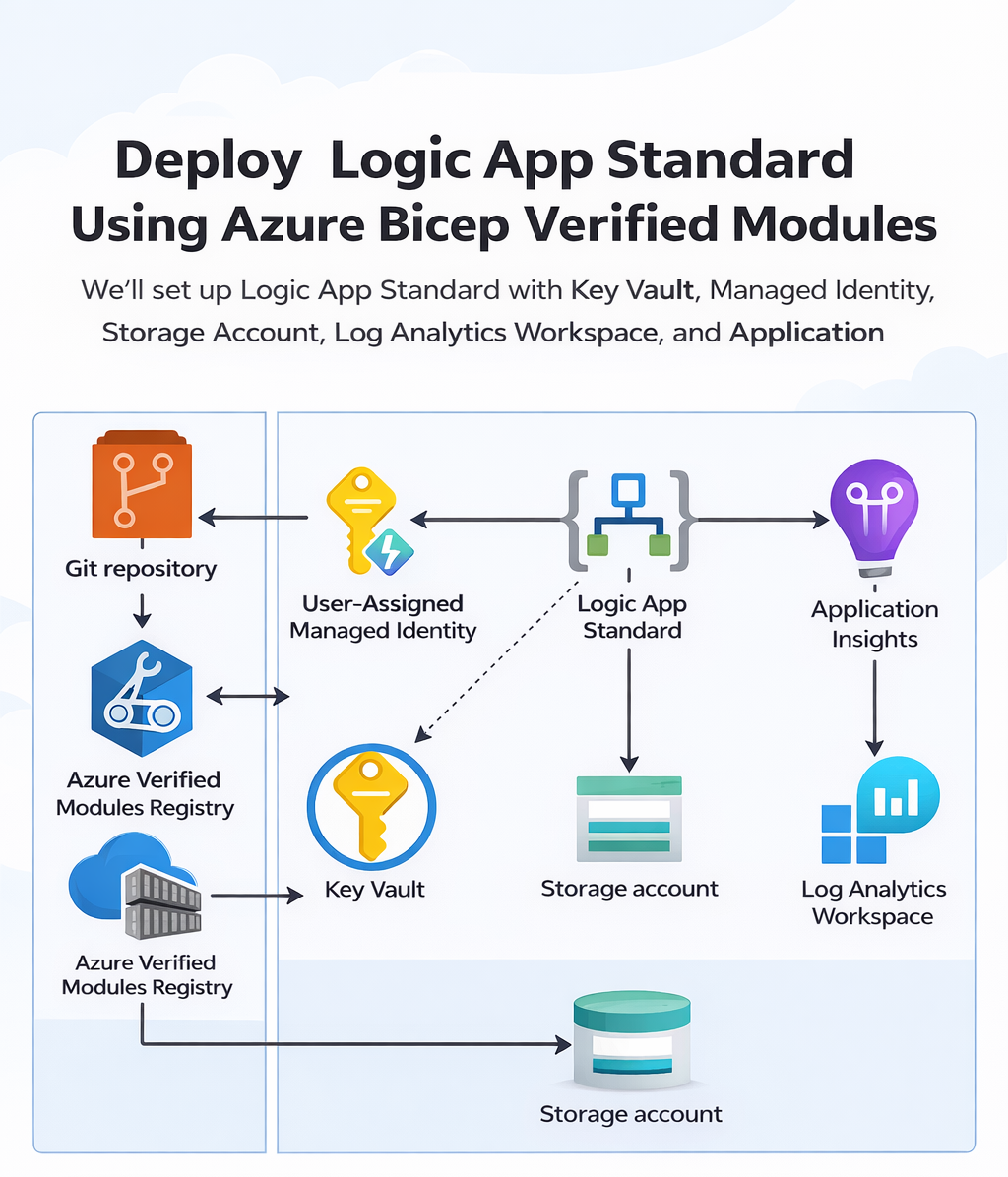
Our deployment will include:
- Resource Group
- App Service Plan (Workflow Standard)
- Storage Account
- Managed Identity
- Key Vault
- Log Analytics Workspace
- Application Insights
- Logic App Standard
Below is an architectural overview of the application landscape and release process:
Prerequisites
Before starting, ensure you have:
- Azure CLI installed
- Bicep installed
- Active Azure Subscription
Step 1: Create Resource Group
targetScope = 'resourceGroup'

param location string = resourceGroup().locationStep 2: Create Hosting Plan
Logic App Standard requires a Workflow Standard plan.
resource hostingPlan 'Microsoft.Web/serverfarms@2023-01-01' = {
  name: 'logicapp-plan'
  location: location
  sku: {
    name: 'WS1'
    tier: 'WorkflowStandard'
  }
}Step 3: Create Managed Identity
resource identity 'Microsoft.ManagedIdentity/userAssignedIdentities@2023-01-31' = {
  name: 'logicapp-identity'
  location: location
}Step 4: Create Storage Account
resource storage 'Microsoft.Storage/storageAccounts@2023-01-01' = {
  name: 'stlogicappdemo'
  location: location
  sku: {
    name: 'Standard_LRS'
  }
  kind: 'StorageV2'
}Step 5: Create Key Vault
resource keyVault 'Microsoft.KeyVault/vaults@2023-02-01' = {
  name: 'kv-logicapp-demo'
  location: location
  properties: {
    tenantId: subscription().tenantId
    sku: {
      name: 'standard'
      family: 'A'
    }
  }
}Step 6: Monitoring Resources
Log Analytics
resource logAnalytics 'Microsoft.OperationalInsights/workspaces@2022-10-01' = {
  name: 'log-logicapp'
  location: location
}Application Insights
resource appInsights 'Microsoft.Insights/components@2020-02-02' = {
  name: 'appi-logicapp'
  location: location
  kind: 'web'
}Step 7: Deploy Logic App Standard
resource logicApp 'Microsoft.Web/sites@2023-01-01' = {
  name: 'logicapp-standard-demo'
  location: location
  kind: 'functionapp,workflowapp'
  identity: {
    type: 'UserAssigned'
    userAssignedIdentities: {
      '${identity.id}': {}
    }
  }
  properties: {
    serverFarmId: hostingPlan.id
    siteConfig: {
      appSettings: [
        {
          name: 'AzureWebJobsStorage'
          value: storage.properties.primaryEndpoints.blob
        }
      ]
    }
  }
}Deployment Command
az deployment group create \
  --resource-group my-rg \
--template-file main.bicepBicep Logic App Module
Logic App Consumption has its own dedicated module in Azure Bicep Verified Modules because, in Azure, it is implemented as a distinct resource type. In contrast, Logic App Standard isn’t a separate resource type; it’s deployed as a Web App (“site”) with a specific kind value: functionapp,workflowapp.
At the moment, Azure Bicep Verified Modules do not provide a dedicated module specifically for Logic App Standard. That said, this topic appears to be part of ongoing discussions, and a dedicated module may be introduced in the future.
Conclusion
Deploying a Logic App Standard with Azure Bicep Verified Modules is actually quite straightforward. It’s been a pleasant experience, and the modules are built on standards and best practices. I highly recommend everyone to follow this project and consider upgrading your deployment scripts to use these verified modules.